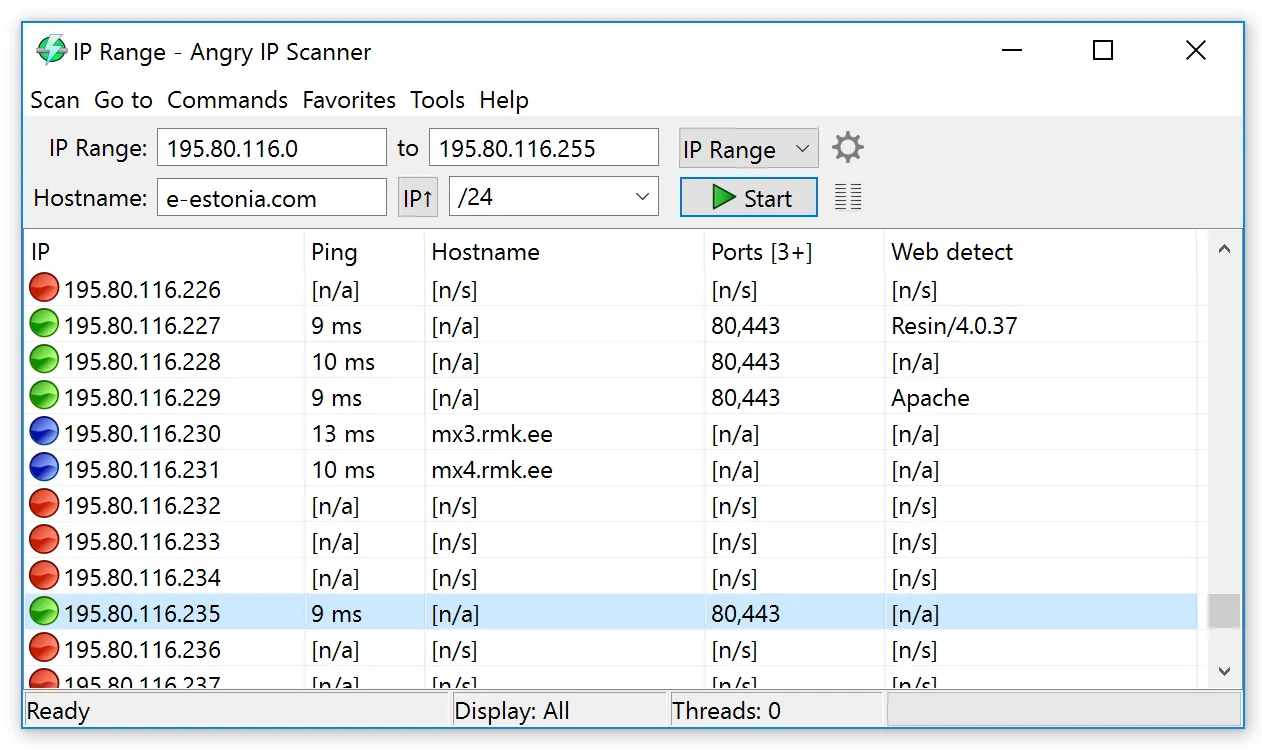
The DHCP scope for the server VLAN says 40 leases, AD says 31 computer objects in the Servers OU, and the monitoring system has 28 hosts. Somewhere in that gap are a forgotten test VM, a printer with a static IP someone “borrowed”, and maybe a decommissioned box that was never actually turned off. Before you clean up stale AD records, you want a ground-truth list of what answers on the wire. Angry IP Scanner gives you that in about the time it takes to type the range, on a network you administer.
What it does
Angry IP Scanner pings each address in a range, a list, or a set of random addresses, then runs “fetchers” against the hosts that answer. Default and optional fetchers include:
- ping time and TTL;
- hostname via reverse DNS;
- open TCP ports from a list you define, for example
22,80,135,443,445,3389,5985; - NetBIOS info — computer name, workgroup/domain, logged-on user where exposed, MAC address;
- MAC vendor lookup on the local segment;
- web server detection for HTTP ports.
Results can be filtered to live hosts only, which became the default display in the current release, sorted, and exported as CSV, TXT, XML or an IP:port list; scripted runs can use the command-line mode instead. The “Open with” menu passes a selected host to your own commands — mstsc /v:{ip}, a browser, or Enter-PSSession {hostname} in a new console — which makes it a handy launcher during triage.
At the time of writing the current release is 3.10.0, published on GitHub on August 31, 2026. It requires Java 21 or newer; Windows and macOS builds bundle a Java runtime, so you don’t need a separate JRE on those platforms. It also runs on Linux.
Rights, traffic and footprint
It runs as a normal user. On Windows, ICMP ping works without elevation. What it sends is simple and loud:
- ICMP echo (or a TCP/UDP probe method you choose) to every address in range;
- TCP connection attempts to each port you list;
- NetBIOS name queries on UDP 137.
That traffic is exactly what IDS sensors, EDR network protection and some switches’ storm or scan detection watch for. Before sweeping a server VLAN, tell whoever watches alerts, keep port lists short, and avoid scanning ranges you don’t own, including cloud provider ranges and partner links. From the targets’ side, you’ll show up as connection attempts in firewall logs (Windows Firewall logging, if enabled, records dropped packets) and nothing else — it doesn’t authenticate or log on.
Use only on networks you administer and with your organisation’s authorization. Even a harmless sweep of someone else’s network can breach policy or law.
Where it’s strong
- Very fast. It scans many hosts in parallel, and the current release enables Java virtual threads by default.
- Free and open source under GPLv2, with source available on GitHub.
- Cross-platform, including macOS and Linux admin laptops.
- A portable Windows build and a command line that make it easy to keep on a jump box.
- Extensible through plugins if you write Java.
Where it falls short and who should skip it
It’s a discovery sweep, not an inventory or vulnerability tool. It won’t tell you patch levels, installed software or service versions beyond what a banner reveals. NetBIOS results depend on hosts answering NBNS, which many hardened Windows builds and non-Windows devices don’t. There’s no scheduling, database or change tracking between runs; comparing last week’s scan with this week’s is a diff of two CSVs. Security teams sometimes flag it simply because it’s a scanner, and some endpoint products may warn about it. If you need authenticated inventory of Windows machines, a management tool with credentials — or Get-ADComputer joined against DNS and DHCP — gives richer data.
Who it suits
Admins who need a quick picture of which IPs are alive and which management ports answer: before an AD cleanup, during a VLAN migration, when documenting an inherited network, or when checking that RDP (3389) and WinRM (5985) are only open where they should be. It pairs well with deeper tools rather than replacing them.
Licensing and cost
Anton Keks publishes Angry IP Scanner as free software under version 2 of the GNU GPL. There’s no paid edition, and commercial use is fine under the GPL. Nothing to budget.
How it compares
For packet-level questions — why a connection fails once it’s found — Wireshark is the next step. Sysinternals tools like PsPing and TCPView answer single-host port questions from Windows itself. If your goal is stale AD computer objects, combine a sweep with the PowerShell in find and clean up stale computer accounts in Active Directory, using RSAT. Other options are listed in Server & Workstation Triage.
Getting it safely
The two sources to trust are angryip.org and the GitHub releases page that angryip.org itself points to. GitHub shows a SHA-256 digest for each release asset; compare it with Get-FileHash -Algorithm SHA256. Avoid repackaged copies on third-party sites. More on this at where to get it.
FAQ
Do I need to install Java first?
Not on Windows or macOS: those builds bundle a Java runtime. On Linux, or with the platform-independent JAR, you need Java 21 or newer.
Can it scan by hostname list instead of IP range?
Yes. You can feed it a file of addresses or names in almost any format, and it extracts what it can scan.
Will it show which user is logged on to a PC?
Only if the machine answers NetBIOS name queries and exposes that information. For reliable answers on domain machines, use admin tools such as quser or a session manager instead.
Is it safe to run on a production network?
Technically the traffic is lightweight, but it looks like reconnaissance to security tooling. Get authorization, notify your security team, and limit ports and ranges.