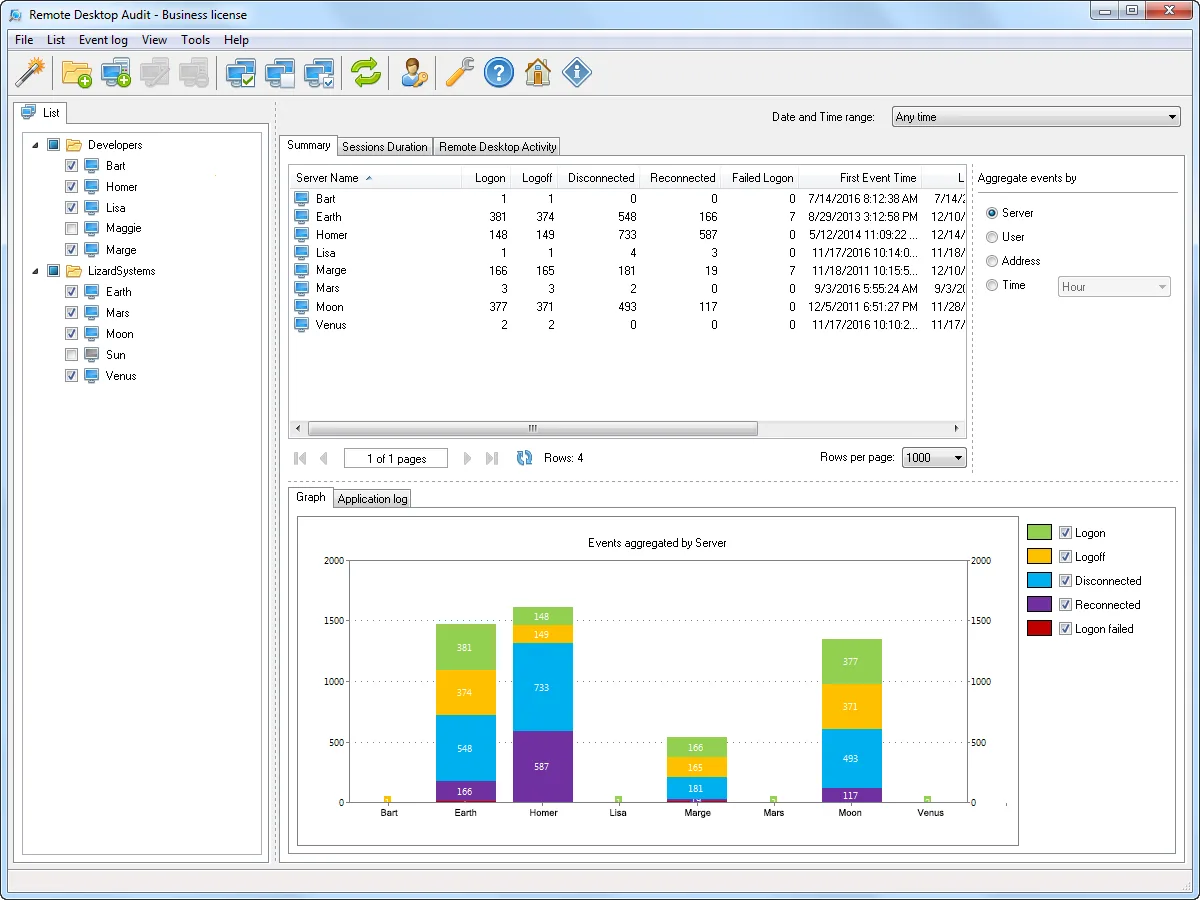
Someone from finance asks a fair question: who connected to the accounting server over RDP last Thursday evening, and from which IP? You know the answer is in the event logs. You also know it is spread across two channels — the Security log with event 4624 (logon type 10) and 4625, and Microsoft-Windows-TerminalServices-LocalSessionManager/Operational with events 21, 23, 24 and 25 — and that stitching logon, disconnect, reconnect and logoff into one session timeline by hand is an afternoon. LizardSystems Remote Desktop Audit is built for that afternoon. It collects those events from the servers you pick and presents them as sessions rather than raw records.
What it does
You add servers to a list and tick the ones to analyse. There’s no agent: the tool reads the remote event logs over the network and stores what it finds in a local SQLite database, so the history you have collected survives log rollover on the server (a “force update all events” command exists for when you want a full re-read). Release notes from 2021 onward add descriptions for LocalSessionManager events 32, 34 and 39 through 42 — the reconnect and session-arbitration records that usually get ignored.
Once collected, the data can be filtered by server, user, client IP or time window, aggregated along any of those axes, and viewed as tables or charts. The feature that saves the most time is session reconstruction: the tool calculates session duration and groups connect/disconnect/reconnect records so you see “jsmith, 10.0.4.23, 19:02–21:47, two reconnects” instead of seven separate events. Failed logons are surfaced too, which makes password-spraying attempts against an exposed RDP host easier to spot — ideally prompting you to put that host behind an RD Gateway or VPN.
Current version at the time of writing is 25.05, released in May 2025, a maintenance release. Before that the last update was 22.08 in 2022. The pace is slow; the event formats it reads have not changed much in the same period, but keep it in mind.
Rights and what the audit trail looks like
The vendor’s FAQ is direct: local admin rights to use it on one machine, domain admin rights to use it across the network. That is broader than strictly needed. Reading the Security log remotely only requires membership in the built-in Event Log Readers group on each target, and the vendor itself points to that option. A least-privilege setup looks like this:
- Create a domain group such as
RDS-Log-Readersand add the auditing account. - Use Group Policy (Restricted Groups or Group Policy Preferences) to add it to
BUILTIN\Event Log Readerson the session hosts. - Check channel permissions with
wevtutil gl Securityandwevtutil gl Microsoft-Windows-TerminalServices-LocalSessionManager/Operational. - Allow Remote Event Log Management through Windows Firewall (the predefined rule group covers the RPC endpoints).
Two dependencies matter. First, the Security log only holds what your audit policy records — enable “Audit Logon” success and failure under Advanced Audit Policy, and size the log so a week of events isn’t overwritten by noon Tuesday. Second, the tool reads; it doesn’t change anything on the server, so the only footprint in the target’s own logs is your account’s network logon for the query.
Use only on systems you administer and with your organisation’s authorization. Logon records are personal data in many jurisdictions; keep the database access-controlled and retain it only as long as policy allows.
Where it’s strong
- Session-shaped reporting: duration, reconnects, client IP in one row.
- History that outlives the server’s log retention thanks to the local database.
- Agentless collection from any number of hosts; the FAQ states no limit on computer count.
- Cheap for a single auditor workstation.
Where it falls short and who should skip it
The platform list stops at Windows 8, Server 2012 R2, Windows 10, Server 2016 and Server 2019. Windows 11 and Server 2022/2025 are not listed at the time of writing, so running it against or from newer builds is outside what the vendor states. It is a 32-bit desktop program with no scheduled reporting, no alerting and no SIEM forwarding. There’s no free tier — only an evaluation that runs on one machine with nag screens. If you already ship Security and LocalSessionManager events into a SIEM or Windows Event Forwarding collector, a saved query there will do the same job. And anyone who needs tamper-evident, compliance-grade audit reports should look at a dedicated platform instead.
Who it suits
Small and mid-size shops with a handful of RDP-exposed servers, no SIEM, and a recurring need to answer “who was on that box and when” — for incident review, billing disputes with contractors, or licence planning. It also fits an MSP technician who wants a quick session history for a customer server without deploying anything.
Licensing and cost
At the time of writing the vendor sells a Business licence at US$99.95 per machine and a Corporate licence at US$1,999.95 for unlimited installations and technicians. Both are perpetual with a year of updates. Unlike its sister products, there is no free personal licence. Check the vendor’s pricing page for current numbers.
How it compares
The live-session counterpart is Terminal Services Manager, which also shows recent session history but centres on acting on sessions now. For wider change auditing — AD, Group Policy, file servers — with scheduled compliance reports, Netwrix Auditor plays in a different weight class and price bracket. If you prefer to do it by hand, our guide on pulling RDP logon history from event logs walks through the event IDs and Get-WinEvent filters. More options sit under RDS & Session Management and Active Directory Management & Auditing.
Getting it safely
Use the LizardSystems product page and nothing else. Each release page lists a SHA-256 value; verify it with Get-FileHash -Algorithm SHA256 and confirm the digital signature before running. See where to get it for the general checklist.
FAQ
Which event IDs does it rely on?
The vendor describes it as reading Remote Desktop session information from the Terminal Services event logs and the Security log; its release notes name LocalSessionManager events 32, 34 and 39–42 among those it describes. The core session events there are 21, 23, 24 and 25.
Does it work against Windows Server 2008?
No. The FAQ says the LocalSessionManager channel it needs isn’t available on 2008; 2008 R2 is the minimum.
Do I really need domain admin?
The vendor states domain admin for network-wide use, but reading remote logs typically works with Event Log Readers membership plus the firewall rule for remote event log management. Test with a reduced account first.
Is there a free edition?
No. You can evaluate it on one computer with reminder screens; ongoing use needs a paid licence.