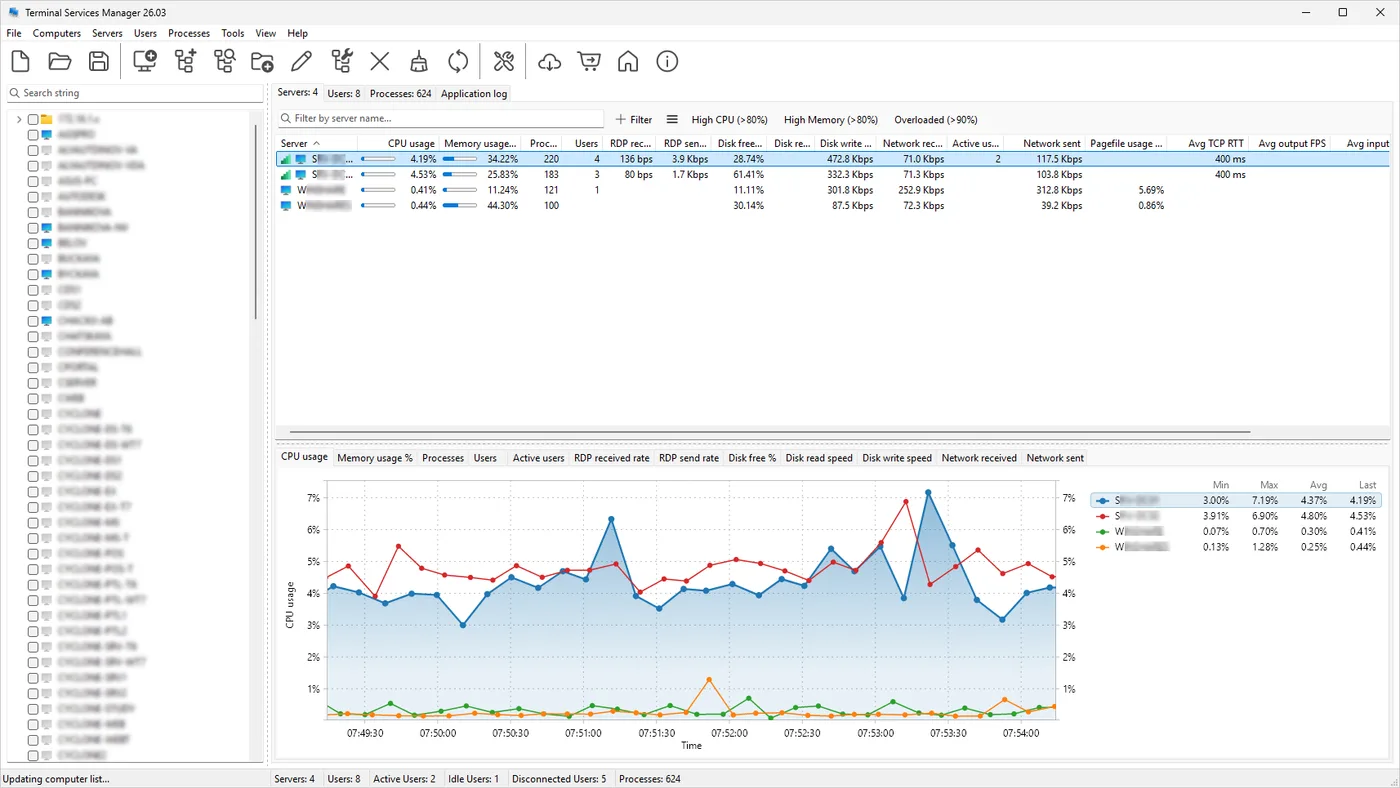
It is 8:40 on a Monday and the helpdesk queue already has three tickets that read “can’t log in, says I’m already connected”. Somewhere across your four session hosts there are disconnected sessions holding profile locks, and the in-box tools make you check each server in turn: Server Manager’s RDS pane if you run a full deployment, quser /server:rds02 if you don’t, then logoff 5 /server:rds02 once you find the culprit. LizardSystems Terminal Services Manager exists for exactly this chore. It fills the gap left by the old tsadmin.msc snap-in, which Microsoft dropped after Server 2008 R2, and puts every host’s sessions in one tree.
What it does on a typical RDS farm
You install it on your admin workstation or a management server — nothing goes on the session hosts. The vendor documents three data paths: the Windows Terminal Services (WTS) API for sessions, users and processes; performance counters for CPU, memory, disk and network; and the event log for session history and failed logons. The result is a live view of per-server metrics, session state and each user’s processes.
The actions are the ones you would otherwise script around qwinsta, rwinsta, logoff and msg: disconnect, log off, reset, send a message, and shadow a session over RDP. Bulk operations are where it earns its keep — log off every session disconnected for more than a set time, across all hosts, in one pass. Newer builds add a per-session RDP connection-quality rating (frame quality, packet loss), handy when “the server is slow” really means hotel Wi-Fi. The vendor also lists remote profile management, RDS licensing info, remote restart and CSV export, plus what it counts as 133 built-in administrative commands.
Current version at the time of writing is 26.04.3 (April 2026). The 26.x line brought Windows 11 support, a dark theme, a 64-bit build and session history with HTML reports — clearly actively maintained.
Rights, ports and the audit trail
The vendor’s FAQ says you need administrator rights on the hosts you manage, and the program asks for elevation at start. Traffic from your console to each host:
- TCP 445 (SMB) — WTS API calls and performance counters
- TCP 135 plus the dynamic RPC range — counters and event log reads
- TCP 3389 — only when you connect to or shadow a session
- ICMP and TCP 135 — host availability checks
In most domains the built-in “Remote Administration” and “Windows Management Instrumentation (WMI)” firewall rule groups already cover this. If shadowing is the only thing a junior tech needs, the vendor suggests granting the RDS remote-control permission rather than full admin — a sensible least-privilege move. Shadowing follows your Group Policy consent settings (“Set rules for remote control of Remote Desktop Services user sessions”), so if your policy requires user permission, the user is prompted.
What it leaves behind: because it uses standard APIs, your actions show up the way any admin tool’s would — logoffs and disconnects appear in the TerminalServices-LocalSessionManager operational log, and remote logons by your admin account land in the Security log. There is no separate audit database of who clicked what, so if you need that, pair it with change auditing from a tool such as Netwrix Auditor.
Use only on systems you administer and with your organisation’s authorization. Shadowing and process views are support tools, not a way to observe colleagues without their knowledge.
Where it’s strong
- One screen for many hosts, with no agent to deploy, patch or explain to security.
- Bulk cleanup of stale disconnected sessions by time threshold.
- Connection-quality columns that turn vague “RDP is laggy” reports into something measurable.
- A free personal licence for home labs.
Where it falls short and who should skip it
It is a Windows desktop console: no web UI, no shared multi-admin view, no API. If three admins want the same live picture, each needs an installation and licence. The vendor describes monitoring and actions, not alerting, so don’t expect paging when a host fills up. Its supported-OS list starts at Windows 10 and Server 2016, so a leftover 2012 R2 host is outside what the vendor states. Teams that already run a full RDS deployment with Connection Broker and are comfortable in PowerShell (Get-RDUserSession -CollectionName ... | Invoke-RDUserLogoff) may find the gain small. And a single-host shop can live with quser indefinitely.
Who it suits
Admins running two to a dozen session hosts — standalone RDSH boxes or a broker-less farm — who spend real time on session hygiene, and MSP technicians who manage several customers’ RDS servers from a jump box.
Licensing and cost
At the time of writing the vendor lists three tiers: a free Personal licence (non-commercial use only), a Business licence at US$299.95 per machine, and a Corporate licence at US$5,999.95 covering unlimited installations and technicians. Paid tiers are perpetual with a year of updates. The unregistered build runs without feature limits for evaluation on one machine, with reminder screens. Licensing is per console machine, not per managed server. Check the vendor’s pricing page for current figures before you budget.
How it compares
Against Windows Admin Center, the difference is scope: WAC is a free, browser-based server manager with a Remote Desktop tool, but it looks at one server at a time and has little session-level housekeeping; the full breakdown is in Terminal Services Manager vs Windows Admin Center. For historical “who logged on when” reports rather than live sessions, the sister product Remote Desktop Audit is the better fit. Browse the rest in RDS & Session Management, or follow the walkthrough in see who is logged on to your RDS hosts.
Getting it safely
Get it from the LizardSystems product page only. The vendor publishes a SHA-256 value for each release on its release notes pages; compare it with Get-FileHash .\<file> -Algorithm SHA256 before running anything, and check the Authenticode signature in the file’s properties. Our where to get it page explains the general routine.
FAQ
Does it need an agent on each session host?
No. It uses the WTS API, performance counters and the event log over SMB and RPC, so the hosts need nothing installed — just reachable ports and an account with admin rights.
Can a non-admin helpdesk tech use it to shadow sessions?
The vendor suggests granting the remote-control right on the RDS host for that purpose instead of local admin. Other actions, such as log off across servers, still expect administrative rights. Whoever does the shadowing, keep the Group Policy setting “Set rules for remote control of Remote Desktop Services user sessions” on a “with user’s permission” option, so the user sees a prompt and agrees before anyone joins the session, and use it only for support the user has asked for.
Is it the same as Microsoft’s old Terminal Services Manager?
No. It is a separate LizardSystems product, and it manages many hosts at once rather than one.
Does the free licence cover a small business?
No. The Personal licence is for non-commercial use only; any business use needs a paid licence per machine where it is installed.